Read what Echo found in your earlier meetings with the same people, ask follow-up questions and draft the questions you want to ask.
Before each calendar meeting, Echo looks for earlier meetings with the same person, the same company or the same recurring series, and writes a short brief from them. Each line links to its source, usually the meeting it came from, with its date and how long ago it was.
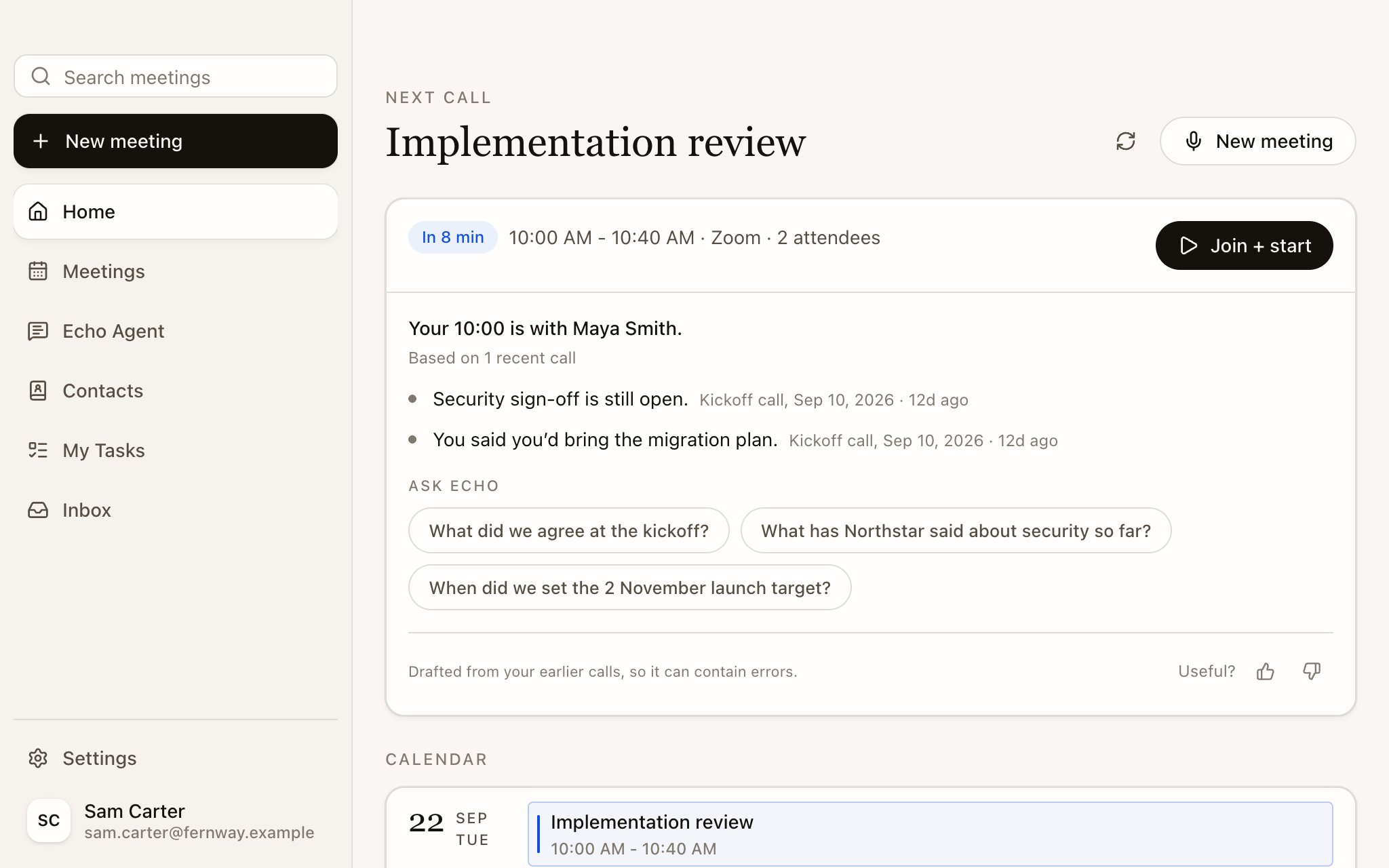
When your next meeting has a brief, Home shows it on the upcoming meeting card with the time, a Join + start button and a few Ask Echo suggestions. The screenshot below shows the earlier Next call layout; see Home for the upcoming Suggestions interface.
A brief has at most a few lines. It can say there is nothing useful yet, which is normal for a first meeting with someone. Open items from earlier calls that this meeting’s topic doesn’t cover are labelled Still open from earlier calls.
For a group meeting, matching on people needs at least two attendees from an earlier meeting. One shared colleague isn’t enough, so one client’s history doesn’t leak into another client’s brief. Echo also uses earlier meetings in the same recurring series or with the same client company.
Select the meeting to open its brief page. It has three views.
View
What’s in it
Brief
The brief, Context sources (the earlier meetings it was written from) and an Ask Echo box for follow-up questions such as “What did Maya say about the migration plan?”
Notes
Your own notes for this meeting. They save as you type, and Echo doesn’t send them to AI or to memory on its own
Files
Attachments and screenshots for this meeting
You can also change the Meeting type here before you start. Echo marks the one it suggests with Suggested.
If Questions to ask is on for the Meeting Type, the brief page proposes three to five questions based on what’s still open. Edit them as you like, one per line. Select Generate to draft them again from the latest research. Your edits stay yours when Echo refreshes the research.During the meeting, Echo grades each question against what the other person says: a good answer, a partial answer or a weak one, with a follow-up to ask when an answer falls short. See Turn on live help.
Questions to ask are off in every Meeting Type until you switch them on in Settings › Meeting types.
Every brief ends with Useful? and a thumbs up or down. A thumbs down asks What was wrong? so you can say what missed. Select the same thumb again to take your rating back.
Each Meeting Type has its own brief instructions. Open Settings › Meeting types, choose a type and edit How Echo briefs you. For example: “Lead with open commitments on both sides. Skip small talk.” See Meeting Types.
{"docsConfig":{"theme":"mint","$schema":"https://mintlify.com/docs.json","name":"Echo","description":"Echo is an AI meeting assistant by Skillflo, for Mac, Windows, iPhone and Android. These docs show how it briefs you before a call, helps during it and keeps track of what was promised after.","colors":{"primary":"#17150A","light":"#FFD522","dark":"#8A6E00"},"logo":{"light":"https://mintcdn.com/callecho/3msX5gJvFFZ4hlDx/logo/light.svg?fit=max\u0026auto=format\u0026n=3msX5gJvFFZ4hlDx\u0026q=85\u0026s=76575b8543174cabe1e2692382f22f35","dark":"https://mintcdn.com/callecho/3msX5gJvFFZ4hlDx/logo/light.svg?fit=max\u0026auto=format\u0026n=3msX5gJvFFZ4hlDx\u0026q=85\u0026s=76575b8543174cabe1e2692382f22f35","href":"/"},"favicon":"https://mintcdn.com/callecho/3msX5gJvFFZ4hlDx/favicon.svg?fit=max\u0026auto=format\u0026n=3msX5gJvFFZ4hlDx\u0026q=85\u0026s=36220fd3842b4f221d6e443b8112596d","appearance":{"default":"light","strict":true},"navbar":{"links":[{"href":"https://www.callecho.ai","label":"callecho.ai"}],"primary":{"type":"button","label":"Get Echo","href":"/get-started/install"}},"fonts":{"family":"Inter"},"contextual":{"options":["copy","view"],"display":"header"},"styling":{"latex":false},"navigation":{"pages":[]}},"deployment":{"deploymentMetadataValue":{"subdomain":"callecho","hasAudioNarration":false,"actualSubdomain":"callecho","customDomains":["docs.callecho.ai"],"gitSource":{"type":"github","owner":"fairmounthouse","repo":"meeting-bot","deployBranch":"main","contentDirectory":"echo/help","isPrivate":true,"mountPath":"","label":""},"chroma":{"latestBuiltDeploymentHistoryId":"6ae2e41f8433eb870769c7a9","collectionId":"74d22ca1-29ad-4d12-838a-f5d4b36ca8ac","liveDeploymentHistoryId":"6ae2e41f8433eb870769c7a9","schemaVersion":"v3"},"entitlements":{},"buildId":"6ae2e41f8433eb870769c7a9","clientVersion":"0.0.4044","searchFilterCounts":[{"language":"default","tag":"Guides","count":31},{"language":"default","tag":"Reference","count":14},{"language":"default","tag":"Paths","count":12},{"language":"default","tag":"Recruiting","count":8},{"language":"default","tag":"Echo everywhere","count":6},{"language":"default","tag":"After a meeting","count":6},{"language":"default","tag":"Start here","count":4},{"language":"default","tag":"Before a meeting","count":4},{"language":"default","tag":"During a meeting","count":4},{"language":"default","tag":"Echo Agent","count":3}]},"assistantConfig":{"enableAskAiButton":false,"enableStarterQuestions":false,"enableContextualStarterQuestions":false,"enableAskAiSearchBar":true},"basePath":"","hasChatPermissions":false,"hasWebMcpPermissions":false,"toggles":[{"name":"kill-isr","enabled":true,"variant":{"name":"disabled","enabled":false,"feature_enabled":true},"impressionData":false},{"name":"agent-mintlify-slack","enabled":true,"variant":{"name":"disabled","enabled":false,"feature_enabled":true},"impressionData":false},{"name":"agent-integrations-settings","enabled":true,"variant":{"name":"disabled","enabled":false,"feature_enabled":true},"impressionData":false},{"name":"automations-pr-grouping","enabled":true,"variant":{"name":"disabled","enabled":false,"feature_enabled":true},"impressionData":false},{"name":"custom-prefix","enabled":true,"variant":{"name":"disabled","enabled":false,"feature_enabled":true},"impressionData":false},{"name":"analytics-v7","enabled":true,"variant":{"name":"disabled","enabled":false,"feature_enabled":true},"impressionData":false},{"name":"user-flows-analytics","enabled":true,"variant":{"name":"disabled","enabled":false,"feature_enabled":true},"impressionData":false},{"name":"no-publish-flow","enabled":true,"variant":{"name":"disabled","enabled":false,"feature_enabled":true},"impressionData":false},{"name":"workos-onboarding","enabled":true,"variant":{"name":"disabled","enabled":false,"feature_enabled":true},"impressionData":false},{"name":"llms-txt-v2","enabled":true,"variant":{"name":"disabled","enabled":false,"feature_enabled":true},"impressionData":false},{"name":"snapshot-serving-live","enabled":true,"variant":{"name":"disabled","enabled":false,"feature_enabled":true},"impressionData":false},{"name":"stripTemperatureMiddleware","enabled":true,"variant":{"name":"disabled","enabled":false,"feature_enabled":true},"impressionData":false},{"name":"support-platform-pylon-zendesk","enabled":true,"variant":{"name":"disabled","enabled":false,"feature_enabled":true},"impressionData":false},{"name":"snapshot-serving","enabled":true,"variant":{"name":"disabled","enabled":false,"feature_enabled":true},"impressionData":false},{"name":"instant-rollback","enabled":true,"variant":{"name":"disabled","enabled":false,"feature_enabled":true},"impressionData":false},{"name":"granular-notifications-server","enabled":true,"variant":{"name":"disabled","enabled":false,"feature_enabled":true},"impressionData":false},{"name":"granular-notifications","enabled":true,"variant":{"name":"disabled","enabled":false,"feature_enabled":true},"impressionData":false},{"name":"automations-fable","enabled":true,"variant":{"name":"disabled","enabled":false,"feature_enabled":true},"impressionData":false},{"name":"fixed-ai-action-pricing","enabled":true,"variant":{"name":"disabled","enabled":false,"feature_enabled":true},"impressionData":false},{"name":"automation-resolve-merge-conflict","enabled":true,"variant":{"name":"disabled","enabled":false,"feature_enabled":true},"impressionData":false},{"name":"scoped-publishing","enabled":true,"variant":{"name":"disabled","enabled":false,"feature_enabled":true},"impressionData":false},{"name":"mintql","enabled":true,"variant":{"name":"disabled","enabled":false,"feature_enabled":true},"impressionData":false},{"name":"page-level-analytics","enabled":true,"variant":{"name":"disabled","enabled":false,"feature_enabled":true},"impressionData":false},{"name":"editor-version-history-v2","enabled":true,"variant":{"name":"disabled","enabled":false,"feature_enabled":true},"impressionData":false},{"name":"billing-page-v2","enabled":true,"variant":{"name":"disabled","enabled":false,"feature_enabled":true},"impressionData":false},{"name":"full-page-search","enabled":true,"variant":{"name":"disabled","enabled":false,"feature_enabled":true},"impressionData":false},{"name":"workspace-projects","enabled":true,"variant":{"name":"disabled","enabled":false,"feature_enabled":true},"impressionData":false},{"name":"assistant-v5","enabled":true,"variant":{"name":"disabled","enabled":false,"feature_enabled":true},"impressionData":false},{"name":"byok-sep-25","enabled":true,"variant":{"name":"disabled","enabled":false,"feature_enabled":true},"impressionData":false},{"name":"fork-pr-previews","enabled":true,"variant":{"name":"disabled","enabled":false,"feature_enabled":true},"impressionData":false},{"name":"revalidation-jwt","enabled":true,"variant":{"name":"disabled","enabled":false,"feature_enabled":true},"impressionData":false},{"name":"vite-origin","enabled":true,"variant":{"name":"disabled","enabled":false,"feature_enabled":true},"impressionData":false},{"name":"billing-updated-9-15","enabled":true,"variant":{"name":"disabled","enabled":false,"feature_enabled":true},"impressionData":false},{"name":"workos-sso-scim","enabled":true,"variant":{"name":"disabled","enabled":false,"feature_enabled":true},"impressionData":false},{"name":"hobby-abuse-scan","enabled":true,"variant":{"name":"disabled","enabled":false,"feature_enabled":true},"impressionData":false},{"name":"dashboard-inbox","enabled":true,"variant":{"name":"disabled","enabled":false,"feature_enabled":true},"impressionData":false},{"name":"workos-signup","enabled":true,"variant":{"name":"disabled","enabled":false,"feature_enabled":true},"impressionData":false},{"name":"turbopuffer-dual-write","enabled":true,"variant":{"name":"disabled","enabled":false,"feature_enabled":true},"impressionData":false},{"name":"workos-enabled","enabled":true,"variant":{"name":"disabled","enabled":false,"feature_enabled":true},"impressionData":false},{"name":"approve-review-flow","enabled":true,"variant":{"name":"disabled","enabled":false,"feature_enabled":true},"impressionData":false},{"name":"sso-setup-deadline-banner","enabled":true,"variant":{"name":"disabled","enabled":false,"feature_enabled":true},"impressionData":false}],"googleFontsInlined":false},"customCss":[{"filePath":"style.css","content":"#content-area a:not([class*=card]):not([class*=button]){text-decoration-line:underline;text-decoration-color:#ffd522;text-decoration-thickness:2px;text-underline-offset:3px}#content-area a:not([class*=card]):not([class*=button]):hover{text-decoration-color:#17150a}#content-area pre[language=text]{white-space:pre-wrap;overflow-wrap:anywhere}#content-area pre[language=text] code{width:100%}#content-area .walkthrough img{width:100%;height:auto}.walkthrough-toggle{display:flex;align-items:center;gap:.5rem;margin-bottom:.75rem;font-size:.875rem}.walkthrough .walkthrough-still,.walkthrough:has(input:checked) .walkthrough-motion{display:none}.walkthrough:has(input:checked) .walkthrough-still{display:block}@media (prefers-reduced-motion:reduce){.walkthrough .walkthrough-motion,.walkthrough .walkthrough-toggle{display:none}.walkthrough .walkthrough-still{display:block}}"}],"page":{"pagePath":"meetings/precall-brief","slug":"/meetings/precall-brief","pageMetadata":{"title":"Prepare with a Precall Brief","sidebarTitle":"Precall Brief","description":"Read what Echo found in your earlier meetings with the same people, ask follow-up questions and draft the questions you want to ask.","href":"/meetings/precall-brief"},"description":{"compiledSource":"\"use strict\";\nconst {jsx: _jsx} = arguments[0];\nconst {useMDXComponents: _provideComponents} = arguments[0];\nfunction _createMdxContent(props) {\n const _components = {\n p: \"p\",\n ..._provideComponents(),\n ...props.components\n };\n return _jsx(_components.p, {\n children: \"Read what Echo found in your earlier meetings with the same people, ask follow-up questions and draft the questions you want to ask.\"\n });\n}\nfunction MDXContent(props = {}) {\n const {wrapper: MDXLayout} = {\n ..._provideComponents(),\n ...props.components\n };\n return MDXLayout ? _jsx(MDXLayout, {\n ...props,\n children: _jsx(_createMdxContent, {\n ...props\n })\n }) : _createMdxContent(props);\n}\nreturn {\n default: MDXContent\n};\n","frontmatter":{},"scope":{}},"pageType":"default","mdx":{"mdxSource":{"compiledSource":"\"use strict\";const{Fragment:_Fragment,jsx:_jsx,jsxs:_jsxs}=arguments[0];const{useMDXComponents:_provideComponents}=arguments[0];function _createMdxContent(props){const _components={a:`a`,p:`p`,strong:`strong`,tbody:`tbody`,td:`td`,th:`th`,thead:`thead`,tr:`tr`,..._provideComponents(),...props.components},{Frame,Heading,Note,OptimizedImage,Table,Tip}=_components;if(!Frame)_missingMdxReference(`Frame`,true);if(!Heading)_missingMdxReference(`Heading`,true);if(!Note)_missingMdxReference(`Note`,true);if(!OptimizedImage)_missingMdxReference(`OptimizedImage`,true);if(!Table)_missingMdxReference(`Table`,true);if(!Tip)_missingMdxReference(`Tip`,true);return _jsxs(_Fragment,{children:[_jsx(_components.p,{children:`Before each calendar meeting, Echo looks for earlier meetings with the same person, the same company or the same recurring series, and writes a short brief from them. Each line links to its source, usually the meeting it came from, with its date and how long ago it was.`}),`\n`,_jsx(Heading,{level:`2`,id:`read-the-brief-on-home`,children:`Read the brief on Home`}),`\n`,_jsxs(_components.p,{children:[`When your next meeting has a brief, Home shows it on the upcoming meeting card with the time, a `,_jsx(_components.strong,{children:`Join + start`}),` button and a few `,_jsx(_components.strong,{children:`Ask Echo`}),` suggestions. The screenshot below shows the earlier Next call layout; see `,_jsx(_components.a,{href:`/meetings/home`,children:`Home`}),` for the upcoming Suggestions interface.`]}),`\n`,_jsx(Frame,{children:_jsx(OptimizedImage,{src:`https://mintcdn.com/callecho/3msX5gJvFFZ4hlDx/images/meetings/home-next-call-v1.png?fit=max\u0026auto=format\u0026n=3msX5gJvFFZ4hlDx\u0026q=85\u0026s=4c02e9bc7f72ec85a253c169ce6eec5c`,alt:`Echo's Home screen at 9:52 with the brief for the 10:00 Implementation review with Maya Smith: security sign-off is still open and you said you'd bring the migration plan, with Join + start, suggested questions and today's calendar below.`,width:`1024`,\"data-og-width\":`2048`,\"data-og-height\":`1280`,\"data-path\":`images/meetings/home-next-call-v1.png`,\"data-optimize\":`true`,\"data-opv\":`3`,srcset:`https://mintcdn.com/callecho/3msX5gJvFFZ4hlDx/images/meetings/home-next-call-v1.png?w=280\u0026fit=max\u0026auto=format\u0026n=3msX5gJvFFZ4hlDx\u0026q=85\u0026s=ba54b621a6e3e2eb8f1db57d091f659e 280w, https://mintcdn.com/callecho/3msX5gJvFFZ4hlDx/images/meetings/home-next-call-v1.png?w=560\u0026fit=max\u0026auto=format\u0026n=3msX5gJvFFZ4hlDx\u0026q=85\u0026s=dc66018080faf256ee68a5fc1a0f617b 560w, https://mintcdn.com/callecho/3msX5gJvFFZ4hlDx/images/meetings/home-next-call-v1.png?w=840\u0026fit=max\u0026auto=format\u0026n=3msX5gJvFFZ4hlDx\u0026q=85\u0026s=ba83590979069c09322631823263dbdf 840w, https://mintcdn.com/callecho/3msX5gJvFFZ4hlDx/images/meetings/home-next-call-v1.png?w=1100\u0026fit=max\u0026auto=format\u0026n=3msX5gJvFFZ4hlDx\u0026q=85\u0026s=63a239c33888d884b81cb19d1698da97 1100w, https://mintcdn.com/callecho/3msX5gJvFFZ4hlDx/images/meetings/home-next-call-v1.png?w=1650\u0026fit=max\u0026auto=format\u0026n=3msX5gJvFFZ4hlDx\u0026q=85\u0026s=1c79a432abe52f5cf9e8c0f0dbed66c3 1650w, https://mintcdn.com/callecho/3msX5gJvFFZ4hlDx/images/meetings/home-next-call-v1.png?w=2500\u0026fit=max\u0026auto=format\u0026n=3msX5gJvFFZ4hlDx\u0026q=85\u0026s=de838180b295681e4c8ef13f84931755 2500w`})}),`\n`,_jsxs(_components.p,{children:[`A brief has at most a few lines. It can say there is nothing useful yet, which is normal for a first meeting with someone. Open items from earlier calls that this meeting’s topic doesn’t cover are labelled `,_jsx(_components.strong,{children:`Still open from earlier calls`}),`.`]}),`\n`,_jsx(Note,{children:_jsx(_components.p,{children:`For a group meeting, matching on people needs at least two attendees from an earlier meeting. One shared colleague isn’t enough, so one client’s history doesn’t leak into another client’s brief. Echo also uses earlier meetings in the same recurring series or with the same client company.`})}),`\n`,_jsx(Heading,{level:`2`,id:`open-the-full-brief`,children:`Open the full brief`}),`\n`,_jsx(_components.p,{children:`Select the meeting to open its brief page. It has three views.`}),`\n`,_jsx(Frame,{children:_jsx(OptimizedImage,{src:`https://mintcdn.com/callecho/3msX5gJvFFZ4hlDx/images/meetings/precall-brief-v1.png?fit=max\u0026auto=format\u0026n=3msX5gJvFFZ4hlDx\u0026q=85\u0026s=41b264727d4d59213f76861476c915c5`,alt:`The meeting brief for the 10:00 Implementation review on its Brief view: two points from the kickoff call, one showing its source, and three prepared questions to ask.`,width:`712`,\"data-og-width\":`1424`,\"data-og-height\":`950`,\"data-path\":`images/meetings/precall-brief-v1.png`,\"data-optimize\":`true`,\"data-opv\":`3`,srcset:`https://mintcdn.com/callecho/3msX5gJvFFZ4hlDx/images/meetings/precall-brief-v1.png?w=280\u0026fit=max\u0026auto=format\u0026n=3msX5gJvFFZ4hlDx\u0026q=85\u0026s=becd340c80f9754dd20e3b8f69ce9213 280w, https://mintcdn.com/callecho/3msX5gJvFFZ4hlDx/images/meetings/precall-brief-v1.png?w=560\u0026fit=max\u0026auto=format\u0026n=3msX5gJvFFZ4hlDx\u0026q=85\u0026s=10228749ceb451849a30ea6a2b69a399 560w, https://mintcdn.com/callecho/3msX5gJvFFZ4hlDx/images/meetings/precall-brief-v1.png?w=840\u0026fit=max\u0026auto=format\u0026n=3msX5gJvFFZ4hlDx\u0026q=85\u0026s=2142596230808cb8510846ac70e478ee 840w, https://mintcdn.com/callecho/3msX5gJvFFZ4hlDx/images/meetings/precall-brief-v1.png?w=1100\u0026fit=max\u0026auto=format\u0026n=3msX5gJvFFZ4hlDx\u0026q=85\u0026s=31ea07c46c3572694fc1c3277a75853b 1100w, https://mintcdn.com/callecho/3msX5gJvFFZ4hlDx/images/meetings/precall-brief-v1.png?w=1650\u0026fit=max\u0026auto=format\u0026n=3msX5gJvFFZ4hlDx\u0026q=85\u0026s=7079258bad1ba6cdf25f0c184c3ede7d 1650w, https://mintcdn.com/callecho/3msX5gJvFFZ4hlDx/images/meetings/precall-brief-v1.png?w=2500\u0026fit=max\u0026auto=format\u0026n=3msX5gJvFFZ4hlDx\u0026q=85\u0026s=9ffbf6fb3111dac2e67ec7055051dfdd 2500w`})}),`\n`,_jsxs(Table,{children:[_jsx(_components.thead,{children:_jsxs(_components.tr,{children:[_jsx(_components.th,{children:`View`}),_jsx(_components.th,{children:`What’s in it`})]})}),_jsxs(_components.tbody,{children:[_jsxs(_components.tr,{children:[_jsx(_components.td,{children:_jsx(_components.strong,{children:`Brief`})}),_jsxs(_components.td,{children:[`The brief, `,_jsx(_components.strong,{children:`Context sources`}),` (the earlier meetings it was written from) and an Ask Echo box for follow-up questions such as “What did Maya say about the migration plan?”`]})]}),_jsxs(_components.tr,{children:[_jsx(_components.td,{children:_jsx(_components.strong,{children:`Notes`})}),_jsx(_components.td,{children:`Your own notes for this meeting. They save as you type, and Echo doesn’t send them to AI or to memory on its own`})]}),_jsxs(_components.tr,{children:[_jsx(_components.td,{children:_jsx(_components.strong,{children:`Files`})}),_jsx(_components.td,{children:`Attachments and screenshots for this meeting`})]})]})]}),`\n`,_jsxs(_components.p,{children:[`You can also change the `,_jsx(_components.strong,{children:`Meeting type`}),` here before you start. Echo marks the one it suggests with `,_jsx(_components.strong,{children:`Suggested`}),`.`]}),`\n`,_jsx(Heading,{level:`2`,id:`draft-your-questions`,children:`Draft your questions`}),`\n`,_jsxs(_components.p,{children:[`If `,_jsx(_components.strong,{children:`Questions to ask`}),` is on for the Meeting Type, the brief page proposes three to five questions based on what’s still open. Edit them as you like, one per line. Select `,_jsx(_components.strong,{children:`Generate`}),` to draft them again from the latest research. Your edits stay yours when Echo refreshes the research.`]}),`\n`,_jsxs(_components.p,{children:[`During the meeting, Echo grades each question against what the other person says: a good answer, a partial answer or a weak one, with a follow-up to ask when an answer falls short. See `,_jsx(_components.a,{href:`/meetings/live-help`,children:`Turn on live help`}),`.`]}),`\n`,_jsx(Tip,{children:_jsxs(_components.p,{children:[`Questions to ask are off in every Meeting Type until you switch them on in `,_jsx(_components.strong,{children:`Settings › Meeting types`}),`.`]})}),`\n`,_jsx(Heading,{level:`2`,id:`rate-the-brief`,children:`Rate the brief`}),`\n`,_jsxs(_components.p,{children:[`Every brief ends with `,_jsx(_components.strong,{children:`Useful?`}),` and a thumbs up or down. A thumbs down asks `,_jsx(_components.strong,{children:`What was wrong?`}),` so you can say what missed. Select the same thumb again to take your rating back.`]}),`\n`,_jsx(Heading,{level:`2`,id:`tune-how-echo-briefs-you`,children:`Tune how Echo briefs you`}),`\n`,_jsxs(_components.p,{children:[`Each Meeting Type has its own brief instructions. Open `,_jsx(_components.strong,{children:`Settings › Meeting types`}),`, choose a type and edit `,_jsx(_components.strong,{children:`How Echo briefs you`}),`. For example: “Lead with open commitments on both sides. Skip small talk.” See `,_jsx(_components.a,{href:`/customize/meeting-types`,children:`Meeting Types`}),`.`]})]})}function MDXContent(props={}){const{wrapper:MDXLayout}={..._provideComponents(),...props.components};return MDXLayout?_jsx(MDXLayout,{...props,children:_jsx(_createMdxContent,{...props})}):_createMdxContent(props)}return{default:MDXContent};function _missingMdxReference(id,component){throw new Error(`Expected `+(component?`component`:`object`)+\" `\"+id+\"` to be defined: you likely forgot to import, pass, or provide it.\")}","frontmatter":{},"scope":{"config":{},"pageMetadata":{"title":"Prepare with a Precall Brief","sidebarTitle":"Precall Brief","description":"Read what Echo found in your earlier meetings with the same people, ask follow-up questions and draft the questions you want to ask.","href":"/meetings/precall-brief"}}},"mdxSourceWithNoJs":null},"mdxExtracts":{"tableOfContents":[{"title":"Read the brief on Home","slug":"read-the-brief-on-home","depth":2,"children":[]},{"title":"Open the full brief","slug":"open-the-full-brief","depth":2,"children":[]},{"title":"Draft your questions","slug":"draft-your-questions","depth":2,"children":[]},{"title":"Rate the brief","slug":"rate-the-brief","depth":2,"children":[]},{"title":"Tune how Echo briefs you","slug":"tune-how-echo-briefs-you","depth":2,"children":[]}],"codeExamples":{}},"jsLinks":[],"subdomain":"callecho","siteName":"Echo","title":"Prepare with a Precall Brief - Echo","navMaps":{"firstHrefInVersion":{},"firstHrefInLanguage":{}},"lastModified":"2026-10-27T07:27:40.211Z","originalFileLocation":"meetings/precall-brief.mdx"},"headHtml":"\u003cscript data-mint-head>(function(){var d=document.documentElement,p=\"light\";if(!p){try{p=localStorage.getItem(\"isDarkMode\")}catch(e){}if(p==='true')p='dark';else if(p==='false')p='light';if(p!=='light'\u0026\u0026p!=='dark'\u0026\u0026p!=='system')p=\"light\"}var r=p==='system'?(matchMedia(\"(prefers-color-scheme: dark)\").matches?'dark':'light'):p;d.classList.remove(r==='dark'?'light':'dark');d.classList.add(r);d.setAttribute(\"data-theme-preference\",p)})();\u003c/script>\u003cmeta data-mint-head name=\"description\" content=\"Read what Echo found in your earlier meetings with the same people, ask follow-up questions and draft the questions you want to ask.\">\u003cmeta data-mint-head name=\"application-name\" content=\"Echo\">\u003cmeta data-mint-head name=\"generator\" content=\"Mintlify\">\u003clink data-mint-head rel=\"icon\" type=\"image/png\" sizes=\"192x192\" href=\"/mintlify-assets/_mintlify/favicons/callecho/Oyhpi_9k98ruotCm/_generated/favicon/android-chrome-192x192.png\" media=\"(prefers-color-scheme: light)\">\u003clink data-mint-head rel=\"apple-touch-icon\" type=\"image/png\" sizes=\"180x180\" href=\"/mintlify-assets/_mintlify/favicons/callecho/Oyhpi_9k98ruotCm/_generated/favicon/apple-touch-icon.png\">\u003clink data-mint-head rel=\"icon\" type=\"image/png\" sizes=\"16x16\" href=\"/mintlify-assets/_mintlify/favicons/callecho/Oyhpi_9k98ruotCm/_generated/favicon/favicon-16x16.png\" media=\"(prefers-color-scheme: light)\">\u003clink data-mint-head rel=\"icon\" type=\"image/png\" sizes=\"32x32\" href=\"/mintlify-assets/_mintlify/favicons/callecho/Oyhpi_9k98ruotCm/_generated/favicon/favicon-32x32.png\" media=\"(prefers-color-scheme: light)\">\u003clink data-mint-head rel=\"shortcut icon\" type=\"image/x-icon\" href=\"/mintlify-assets/_mintlify/favicons/callecho/Oyhpi_9k98ruotCm/_generated/favicon/favicon.ico\" media=\"(prefers-color-scheme: light)\">\u003clink data-mint-head rel=\"icon\" type=\"image/png\" sizes=\"192x192\" href=\"/mintlify-assets/_mintlify/favicons/callecho/Oyhpi_9k98ruotCm/_generated/favicon-dark/android-chrome-192x192.png\" media=\"(prefers-color-scheme: dark)\">\u003clink data-mint-head rel=\"icon\" type=\"image/png\" sizes=\"16x16\" href=\"/mintlify-assets/_mintlify/favicons/callecho/Oyhpi_9k98ruotCm/_generated/favicon-dark/favicon-16x16.png\" media=\"(prefers-color-scheme: dark)\">\u003clink data-mint-head rel=\"icon\" type=\"image/png\" sizes=\"32x32\" href=\"/mintlify-assets/_mintlify/favicons/callecho/Oyhpi_9k98ruotCm/_generated/favicon-dark/favicon-32x32.png\" media=\"(prefers-color-scheme: dark)\">\u003clink data-mint-head rel=\"shortcut icon\" type=\"image/x-icon\" href=\"/mintlify-assets/_mintlify/favicons/callecho/Oyhpi_9k98ruotCm/_generated/favicon-dark/favicon.ico\" media=\"(prefers-color-scheme: dark)\">\u003cmeta data-mint-head property=\"og:title\" content=\"Prepare with a Precall Brief - Echo\">\u003cmeta data-mint-head property=\"og:description\" content=\"Read what Echo found in your earlier meetings with the same people, ask follow-up questions and draft the questions you want to ask.\">\u003cmeta data-mint-head property=\"og:site_name\" content=\"Echo\">\u003cmeta data-mint-head property=\"og:url\" content=\"https://docs.callecho.ai/meetings/precall-brief\">\u003cmeta data-mint-head property=\"og:type\" content=\"website\">\u003cmeta data-mint-head property=\"og:image\" content=\"https://callecho.mintlify.app/_mintlify/api/og/v2?division=Before+a+meeting\u0026amp;title=Prepare+with+a+Precall+Brief\u0026amp;description=Read+what+Echo+found+in+your+earlier+meetings+with+the+same+people%2C+ask+follow-up+questions+and+draft+the+questions+you+want+to+ask.\u0026amp;theme=7ca6806ed538555da0ae8832\u0026amp;signature=c9723c6735df5694be9b9a7fa4d5daeebbfb44fc312eec7256118e27031b8bc0\">\u003cmeta data-mint-head property=\"og:image:width\" content=\"1200\">\u003cmeta data-mint-head property=\"og:image:height\" content=\"630\">\u003cmeta data-mint-head name=\"twitter:card\" content=\"summary_large_image\">\u003cmeta data-mint-head name=\"twitter:title\" content=\"Prepare with a Precall Brief - Echo\">\u003cmeta data-mint-head name=\"twitter:description\" content=\"Read what Echo found in your earlier meetings with the same people, ask follow-up questions and draft the questions you want to ask.\">\u003cmeta data-mint-head name=\"twitter:image\" content=\"https://callecho.mintlify.app/_mintlify/api/og/v2?division=Before+a+meeting\u0026amp;title=Prepare+with+a+Precall+Brief\u0026amp;description=Read+what+Echo+found+in+your+earlier+meetings+with+the+same+people%2C+ask+follow-up+questions+and+draft+the+questions+you+want+to+ask.\u0026amp;theme=7ca6806ed538555da0ae8832\u0026amp;signature=c9723c6735df5694be9b9a7fa4d5daeebbfb44fc312eec7256118e27031b8bc0\">\u003cmeta data-mint-head name=\"twitter:image:width\" content=\"1200\">\u003cmeta data-mint-head name=\"twitter:image:height\" content=\"630\">\u003cmeta data-mint-head name=\"msapplication-config\" content=\"/mintlify-assets/_mintlify/favicons/callecho/Oyhpi_9k98ruotCm/_generated/favicon/browserconfig.xml\">\u003cmeta data-mint-head name=\"apple-mobile-web-app-title\" content=\"Echo\">\u003cmeta data-mint-head name=\"msapplication-TileColor\" content=\"#17150A\">\u003clink data-mint-head rel=\"canonical\" href=\"https://docs.callecho.ai/meetings/precall-brief\">\u003clink data-mint-head rel=\"alternate\" type=\"application/xml\" href=\"/sitemap.xml\">\u003clink data-mint-head rel=\"alternate\" type=\"text/markdown\" href=\"/meetings/precall-brief.md\">\u003cscript data-mint-head type=\"application/ld+json\">{\"@context\":\"https://schema.org\",\"@graph\":[{\"@type\":\"Organization\",\"@id\":\"https://docs.callecho.ai/#organization\",\"name\":\"Echo\",\"url\":\"https://docs.callecho.ai\",\"logo\":{\"@type\":\"ImageObject\",\"url\":\"https://mintcdn.com/callecho/3msX5gJvFFZ4hlDx/logo/light.svg?fit=max\u0026auto=format\u0026n=3msX5gJvFFZ4hlDx\u0026q=85\u0026s=76575b8543174cabe1e2692382f22f35\"}},{\"@type\":\"WebSite\",\"@id\":\"https://docs.callecho.ai#website\",\"name\":\"Echo\",\"url\":\"https://docs.callecho.ai\",\"publisher\":{\"@id\":\"https://docs.callecho.ai/#organization\"}},{\"@type\":\"WebPage\",\"@id\":\"https://docs.callecho.ai/meetings/precall-brief#webpage\",\"url\":\"https://docs.callecho.ai/meetings/precall-brief\",\"name\":\"Prepare with a Precall Brief\",\"description\":\"Read what Echo found in your earlier meetings with the same people, ask follow-up questions and draft the questions you want to ask.\",\"dateModified\":\"2026-10-27T07:27:40.211Z\",\"isPartOf\":{\"@id\":\"https://docs.callecho.ai#website\"},\"breadcrumb\":{\"@id\":\"https://docs.callecho.ai/meetings/precall-brief#breadcrumb\"}},{\"@type\":\"BreadcrumbList\",\"@id\":\"https://docs.callecho.ai/meetings/precall-brief#breadcrumb\",\"itemListElement\":[{\"@type\":\"ListItem\",\"position\":1,\"name\":\"Before a meeting\",\"item\":\"https://docs.callecho.ai/meetings/home\"},{\"@type\":\"ListItem\",\"position\":2,\"name\":\"Prepare with a Precall Brief\",\"item\":\"https://docs.callecho.ai/meetings/precall-brief\"}]},{\"@type\":[\"Article\",\"TechArticle\"],\"@id\":\"https://docs.callecho.ai/meetings/precall-brief#article\",\"headline\":\"Prepare with a Precall Brief\",\"name\":\"Prepare with a Precall Brief\",\"description\":\"Read what Echo found in your earlier meetings with the same people, ask follow-up questions and draft the questions you want to ask.\",\"url\":\"https://docs.callecho.ai/meetings/precall-brief\",\"mainEntityOfPage\":{\"@id\":\"https://docs.callecho.ai/meetings/precall-brief#webpage\"},\"dateModified\":\"2026-10-27T07:27:40.211Z\",\"publisher\":{\"@id\":\"https://docs.callecho.ai/#organization\"},\"isPartOf\":{\"@id\":\"https://docs.callecho.ai#website\"}}]}\u003c/script>\u003cscript data-mint-head type=\"application/ld+json\">{\"@context\":\"https://schema.org\",\"@type\":\"WebSite\",\"name\":\"Echo\",\"creator\":{\"@type\":\"Organization\",\"name\":\"Mintlify\",\"url\":\"https://mintlify.com\"}}\u003c/script>","siteName":"Echo","nav":{"global":null,"tabs":[{"tab":"Guides","groups":[{"group":"Start here","pages":[{"title":"Welcome to Echo","sidebarTitle":"Welcome","href":""},{"title":"Install Echo and sign in","href":"/get-started/install"},{"title":"Your first meeting","href":"/get-started/first-meeting"}]},{"group":"Before a meeting","pages":[{"title":"Your day on Home","sidebarTitle":"Home","href":"/meetings/home"},{"title":"Connect your calendar","description":"Let Echo see your upcoming meetings so it can prepare a brief for each one and remind you to start.","href":"/meetings/connect-calendar"},{"title":"Prepare with a Precall Brief","sidebarTitle":"Precall Brief","href":"/meetings/precall-brief"},{"title":"Start a meeting","description":"Start Echo from Home, a reminder or the meeting-detected prompt, and choose how it captures the call.","href":"/meetings/start-a-meeting"}]},{"group":"During a meeting","pages":[{"title":"Use the live window","href":"/meetings/live-window"},{"title":"Turn on live help","href":"/meetings/live-help"},{"title":"Read live translation","sidebarTitle":"Live translation","href":"/meetings/live-translation"},{"title":"The Meeting Nub and Quick Actions","sidebarTitle":"Meeting Nub","href":"/meetings/meeting-nub"}]},{"group":"After a meeting","pages":[{"title":"Review your notes","href":"/meetings/ai-notes"},{"title":"Transcript, speakers and recordings","href":"/meetings/transcript-and-speakers"},{"title":"Keep track of what you promised","sidebarTitle":"My Tasks","href":"/meetings/my-tasks"},{"title":"Share a meeting","href":"/meetings/share-a-meeting"},{"title":"Find past meetings","href":"/meetings/find-meetings"},{"title":"Import a recording","href":"/meetings/import-a-recording"}]},{"group":"Echo Agent","pages":[{"title":"Work with Echo Agent","sidebarTitle":"Overview","href":"/agent/overview"},{"title":"What you can ask","href":"/agent/what-you-can-ask"},{"title":"Connect apps","href":"/agent/connect-apps"}]},{"group":"Contacts and memory","pages":[{"title":"Contacts","href":"/memory/contacts"},{"title":"Sources","href":"/memory/sources"}]},{"group":"Customize","pages":[{"title":"Meeting Types","href":"/customize/meeting-types"},{"title":"Settings","href":"/customize/settings"}]},{"group":"Teams","pages":[{"title":"Organization and sharing","href":"/teams/organization-and-sharing"}]},{"group":"Echo everywhere","pages":[{"title":"Use Echo anywhere","sidebarTitle":"Overview","href":"/anywhere/index"},{"title":"Echo on your phone","href":"/mobile/echo-on-your-phone"},{"title":"Echo Recorder","href":"/mobile/echo-recorder"},{"title":"Echo on WhatsApp and Telegram","sidebarTitle":"WhatsApp and Telegram","href":"/anywhere/whatsapp-and-telegram"},{"title":"Set up Echo for your agent","sidebarTitle":"Agent setup","href":"/anywhere/agent-setup"},{"title":"Connect your AI app to Echo with MCP","sidebarTitle":"MCP and copyable prompts","href":"/anywhere/ai-apps"}]}]},{"tab":"Paths","pages":[{"title":"Paths","href":"/tracks"}]},{"tab":"Reference","pages":[{"title":"Reference","href":"/reference/platforms"}]}]},"basePath":"","title":"Prepare with a Precall Brief - Echo","buildId":"dpl_DeHjVRGfFnhYQwHnfC2pjeXXv8h9","deploymentId":"dpl_DeHjVRGfFnhYQwHnfC2pjeXXv8h9","dynamics":["07c022d89b","a74be98ba7"],"chunks":["Frame-DXXFP6nH.js","DynamicMarkdown-B54_zNBF.js","zoom-image-lightbox-BG6oD64b.js","lightbox-handle-r17bVUz3.js"]}